About Handyman Calc
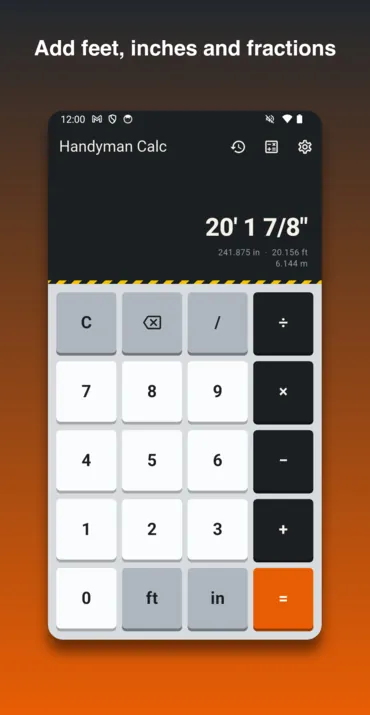
Handyman Calc does the arithmetic in the units you measured in. It adds, subtracts, multiplies and divides feet, inches and fractions directly, so 12′ 4 3/8″ + 7′ 9 1/2″ comes back as 20′ 1 7/8″ without a trip through decimals. Every answer is rounded to the nearest 1/16″, the way a tape is marked, and shown again in decimal inches, decimal feet and metric, because the person cutting and the person ordering rarely work in the same one. Divide by a measurement and it counts instead: 20′ ÷ 16″ answers 15.
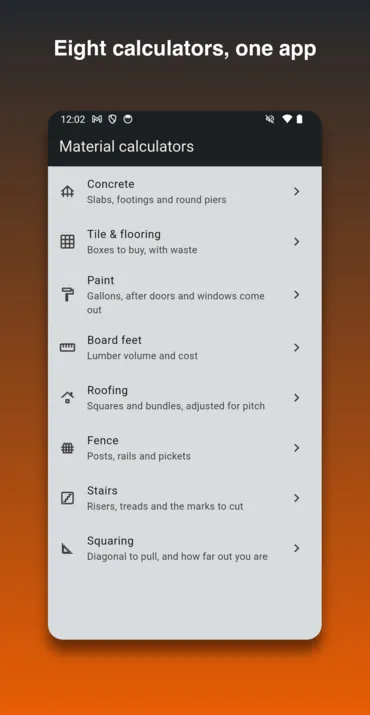
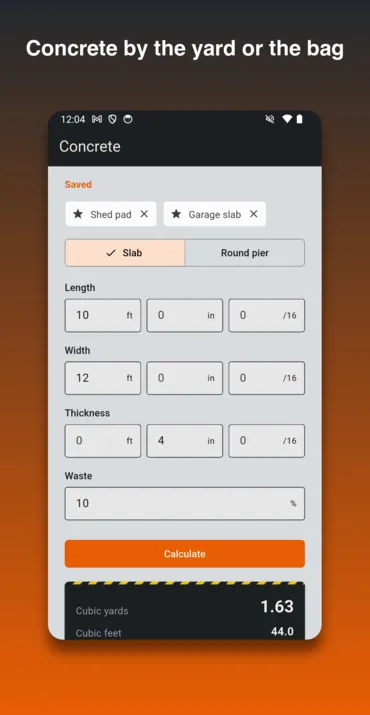
Beside the keypad are eight calculators. Concrete for slabs, footings and round piers, in cubic yards and in 60 lb or 80 lb bags; tile and flooring, with the boxes to buy and the spares left over; paint, after doors and windows come out; board feet and what the lumber costs; roofing squares and bundles, adjusted for pitch. Fence gives posts, sections, rails and pickets; stairs gives every mark to cut; and squaring gives the diagonal to pull and how far out of square a frame is. Any set of numbers can be saved under a name — “garage slab”, “6 ft privacy fence” — and refilled with one tap, and every answer is kept in a recent list to scroll back through on site.
Most calculators work in decimals and round at the end. Handyman Calc keeps every measurement as an exact fraction from the moment it is typed and rounds once, when it shows the answer. A staircase is where that shows: round the riser first and stack seven treads, and the top one can sit a sixteenth proud of the floor. Carried exactly, each mark is rounded on its own and the last one lands on the floor. The stair calculator also says when a flight falls outside the IRC limits — a 7 3/4″ maximum riser and a 10″ minimum tread — rather than quietly working out a step nobody can sign off. Material counts round up, because nobody sells 6.2 boxes of tile.
It pays you nothing. There are no coins in it, no balance and no cash-out — it is a calculator, which is why it sits apart from the four reward apps. The phone app is free and carries advertising: a banner, and an occasional full-screen ad after a calculation, never in the first six after the app opens and never twice inside ninety seconds. There is nothing to buy and no account to create. What the phone app collects — anonymous analytics, crash reports and what the ad network gathers — is set out in its own privacy policy, and none of it includes a measurement or a result.
It is not in either store yet. The Android version is waiting on Google Play’s review and the iPhone and iPad version on Apple’s, and this page will carry the download buttons the day each listing goes live, not before. In the meantime the browser version is the same app, built from the same code, with no ads, no analytics and no account: your recent answers and saved numbers stay in that browser’s storage and nowhere else.
Screenshots
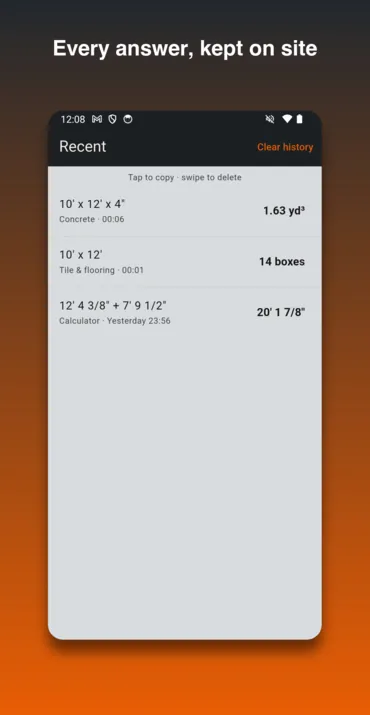
How to use it in the moment
- Type a measurement the way the tape reads it — 12, ft, 4, in, 3, /, 8 — then an operator and the next one.
- Press = for the answer in feet, inches and sixteenths, with decimal and metric underneath.
- Dividing? 20′ ÷ 2 shares a run into equal parts; 20′ ÷ 16″ counts how many fit.
- For materials, open one of the eight calculators, fill in the boxes and press Calculate.
- Save a form you will use again under a name, and it comes back as a chip above that form. Tap a recent answer to copy it.
Features
- Feet, inches and fractions added, subtracted, multiplied and divided
- Exact fractions throughout, rounded once to the nearest 1/16″
- Decimal inches, decimal feet and metric beside every result
- Divide by a measurement to count how many fit
- Concrete for slabs, footings and round piers, in yards and 60 lb or 80 lb bags
- Tile and flooring, paint, board feet, roofing and fence
- Stairs, with every mark to cut and a note when a flight is outside the IRC limits
- Squaring: the diagonal to pull, and how far out of square you are
- Saved numbers on all eight calculators, refilled with one tap
- A recent list of every answer, kept on your device
- Two panes on a tablet or a wide browser window
- No account and no sign-in
Frequently asked questions
When is it coming out?
It is coming soon to the App Store and Google Play. The Android version is waiting on Google Play’s review and the iPhone and iPad version on Apple’s. This page will carry the download buttons the day each listing goes live, and not before — there is no store link here yet because there is no listing to link to. Until then you can try it in your browser.
Does this app pay me anything?
No. It has no coins, no balance and no cash-out; it is a calculator. The four apps we publish that do pay are on our apps page.
Is it free?
Yes. The phone app is free and supported by ads — a banner, and an occasional full-screen ad after a calculation, never in the first six after the app opens. There is nothing to buy. The browser version carries no ads at all, because the ad network has no browser version.
Is the browser version the whole app?
Yes: the same keypad and the same eight calculators, built from the same code. It has no advertising, and the vibration setting is there but does nothing in a browser. On a wide window it switches to the two-pane layout a tablet gets.
Where are my calculations kept?
On the device you did them on. The phone app keeps recent answers and saved numbers on the phone, with no account and no upload. The browser version keeps them in that browser’s storage, so they do not follow you to another browser and clearing your site data removes them. Neither has an account, so nothing syncs between them.
How exact are the answers?
Every measurement is held as an exact fraction and rounded once, to the nearest 1/16″, when it is shown. Material counts always round up. Roofing pitch and squaring diagonals involve square roots, which no fraction holds exactly, so those two are worked in decimals — far more finely than a tape can measure.
Does it check building code?
The stair calculator says whether a flight is within the IRC’s 7 3/4″ maximum riser and 10″ minimum tread, and still works out one that is not, because a garage step is legitimately outside residential code. It is a calculator, not an inspector: check what your local code requires.
Is it affiliated with a tool or materials maker?
No. Handyman Calc is not affiliated with, or endorsed by, any tool or building-materials manufacturer, and it names bags by weight rather than by brand.
Everything else we publish
 Daily: Learn and EarnEducation
 Step and EarnHealth & Fitness
 Play and EarnGames
 Todo and EarnProductivity
 Taco Rain: Catch the TacosCasual
 Peel FrenzyCasual
 Asteroid DuelAction
 Pie Cannon: Carnival ShootoutCasual
 Ship It: Build an App StudioSimulation
 Bramble KnightPlatformer
 BroadsideArcade
 Acorn TrailPuzzle
 Community Stress First AidHealth & Fitness
 Apps That PayFinance
 Stitch Keeper: Row CounterLifestyle