About Let Them Pray: Prayer List
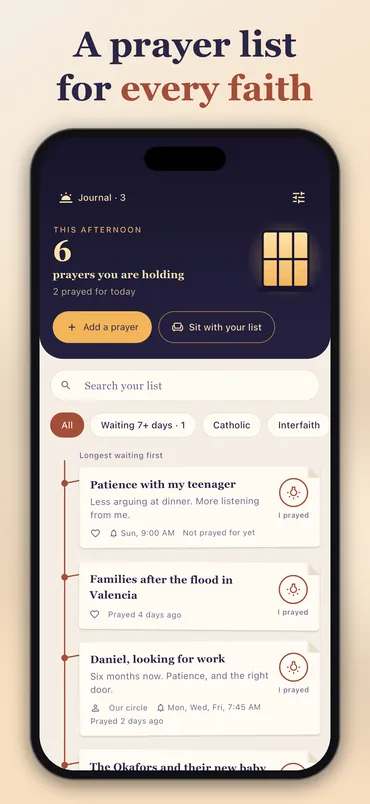
Let Them Pray is a prayer list. Write down the people and intentions you’re holding, in your own words, and they hang like paper notes on a thread under a lit window. Tap I prayed and that note’s knot lights up for the day. The one you’ve waited on longest comes first, so nobody slips to the bottom.
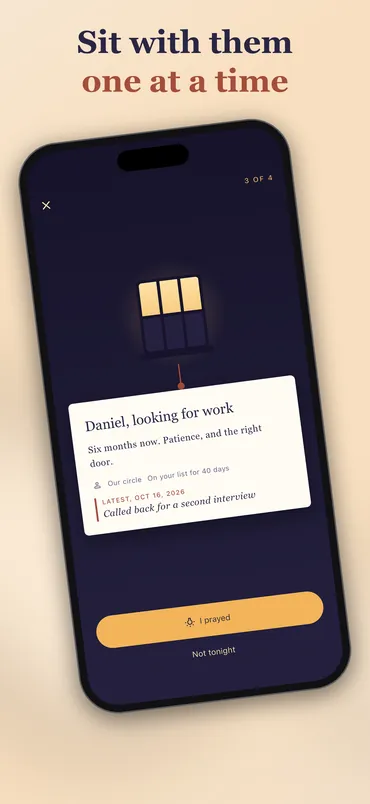
In the evening, Sit with your list opens the notes one at a time, full size, with the latest news under each. You answer I prayed or Not tonight. Each note you hold lights a pane of the window, and at the end you see how many you held. There’s no timer, no score and no streak.
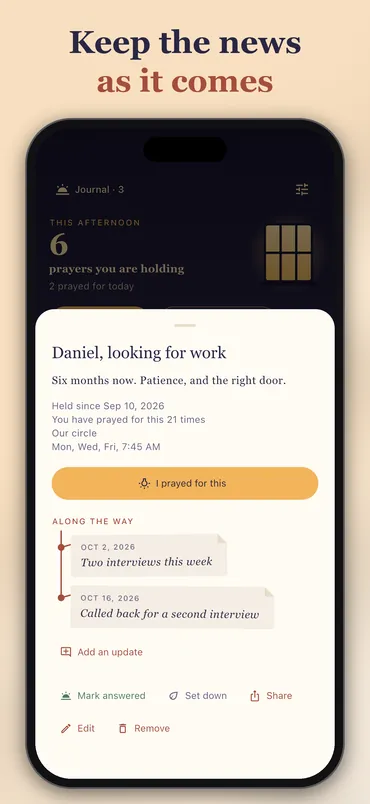
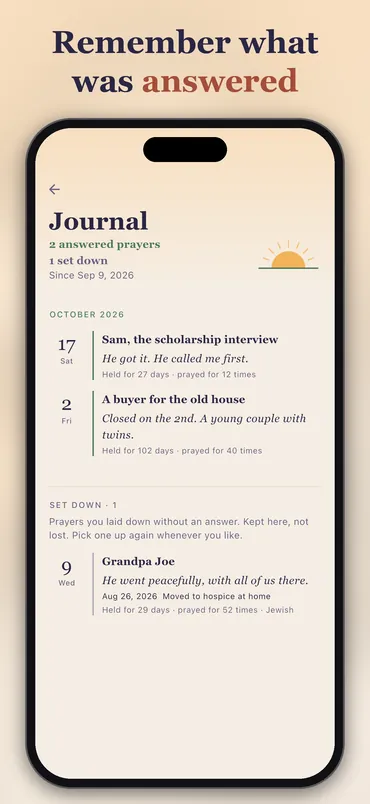
A prayer can change as life does. Add a short dated update when something moves, like a surgery moved to Monday. When it ends, mark it answered with a word about what happened, or set it down if it ended without the answer you hoped for. Both kinds are kept in a journal you can read back month by month, and a prayer set down can be picked up again. Reminders can come for one prayer (daily, on the weekdays you choose, monthly or once on a date), and up to five named moments a day open straight into a sitting.
It’s for every faith. There’s no scripture, no set prayer and no religious symbol anywhere in it. If a label helps, pick one from the list (Catholic, Muslim, Jewish, Sikh, Buddhist and more) or type your own, such as your prayer group’s name. Or use none.
Your list stays on your phone. There’s no account, and nothing you write is uploaded. You can lock the app with Face ID, Touch ID or your passcode, which also hides the list in the app switcher. Reminders say only that a prayer is waiting unless you choose to show names. Settings can save a copy of the list to a file for a new phone, and Delete my data erases everything at once.
It pays nothing and sells nothing. There are no coins, no balance and no cash-out, which keeps it apart from the reward apps, and there’s nothing to buy. One small banner sits under the prayer list, never where you write, sit, read the journal or share. The app shows Apple’s tracking prompt when it opens, and the ads can be personalized if you allow it. It also sends counts-only analytics and crash reports, and neither ever carries your words. All of it is set out in its own privacy policy.
Let Them Pray first came to the App Store in 2018 and left it in 2021. Version 2.0 is a rebuild from the ground up on the same listing, back since 21 October 2026, in English, Spanish and Brazilian Portuguese. Prayers saved in the 2018 app don’t carry over. It’s on the App Store for iPhone and iPad, and it isn’t on Google Play.
Rather start on paper? The free printable prayer list is one page for a week, with the same columns: who or what, updates, the days you prayed and how it ended. The guide to keeping a prayer list walks through the method, on paper or on a phone.
Screenshots
How to use it
- Tap Add a prayer and write who or what it’s for, in your own words.
- Add a label or a reminder if you want one. Both are optional.
- Tap I prayed when you’ve prayed for it today.
- When you have a few minutes, tap Sit with your list and go through it one note at a time.
- When a prayer ends, mark it answered or set it down, and find it again in the journal.
Features
- A prayer list in your own words, longest waiting first
- Sit with your list one note at a time, with no timer or streak
- Dated updates on a prayer as things change
- Two endings: answered, or set down and kept
- A journal to read back month by month
- Reminders daily, on chosen weekdays, monthly or once on a date
- Up to five named moments a day to sit with the list
- Optional tradition labels, your own label, or none
- Search, label filters and the prayers waiting a week or more
- Share one request as plain text, and see it before it goes
- Save a copy of the list to a file and restore it
- App lock with Face ID, Touch ID or your passcode
- List and prayer side by side on an iPad turned sideways
- No account; everything you write stays on the phone
Frequently asked questions
Is it on Android?
No. It’s on the App Store for iPhone and iPad, and it isn’t on Google Play.
Is it free?
Yes, with nothing to buy and no subscription. There’s one small banner under the prayer list, and never one where you write a prayer, sit with your list, read the journal or share.
What happened to my 2018 prayers?
They don’t carry over. Version 2.0 is a new app built from the ground up on the same App Store listing, and it doesn’t read anything the 2018 version saved. There’s no import, and there won’t be one.
Is it only for Christians?
No. It’s for every faith. There’s no scripture, no set prayer and no religious symbol in it. The tradition labels are optional: pick one, type your own or use none.
Is my list private?
Yes. What you write stays on your phone. There’s no account and nothing is uploaded. You can lock the app with Face ID, Touch ID or your passcode, and reminders don’t show names unless you turn that on. The ad, counts-only analytics and crash reports do leave the phone, and none of them carries your words. The details are in the privacy policy.
Does this app pay me anything?
No. It has no coins, no balance and no cash-out. The apps of ours that pay you are on our apps page.
How does it compare to Prayer Notebook or Echo Prayer?
Prayer Notebook is free and collects no data, but hasn’t been updated since June 2021, and it doesn’t sync. Echo Prayer is the most-rated prayer list app, with 21,710 App Store ratings, and has groups, which Let Them Pray doesn’t; creating one needs ECHO+, $15 a year on Echo’s site. We compared them, and four other prayer apps, in apps like Prayer Notebook and apps like Echo Prayer, with our interest declared at the top.
Everything else we publish
 Daily: Learn and EarnEducation
 Step and EarnHealth & Fitness
 Play and EarnGames
 Todo and EarnProductivity
 Taco Rain: Catch the TacosCasual
 Peel FrenzyCasual
 Asteroid DuelAction
 Pie Cannon: Carnival ShootoutCasual
 Ship It: Build an App StudioSimulation
 Bramble KnightPlatformer
 BroadsideArcade
 Acorn TrailPuzzle
 Wobble WheelieArcade
 Tilt DuoArcade
 HoverlineRacing
 Mix a BeastCasual
 Sizzle SwapCasual
 Community Stress First AidHealth & Fitness
 Apps That PayFinance
 Stitch Keeper: Row CounterLifestyle
 Handyman CalcTools
 Card Lab: Trading Card MakerEntertainment
 Dead Center: Card CenteringTools
 Practice Proof: Practice LogMusic & Audio
 Which FormulaEducation
 Househand: Home MaintenanceHouse & Home
 Chess Clock & ScorepadTools
 Initiative Tracker: DM ToolsEntertainment
 Covert Mail: Morse & CiphersEducation