About Card Lab: Trading Card Maker
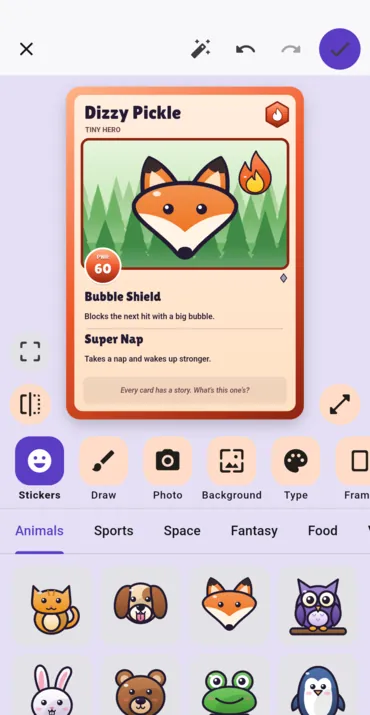
Card Lab opens straight onto a card. Tap Make a card and one is already there — a creature, a name and two moves — with nothing to answer first. A row of picture buttons under it opens stickers, drawing, a photo, the background, the type, the frame, the back, the kind of card, the words and the numbers, one at a time. The pictures come before the words because the person making the card may not read yet, and nothing needs typing: the dice pick a name, and the moves come from a list.
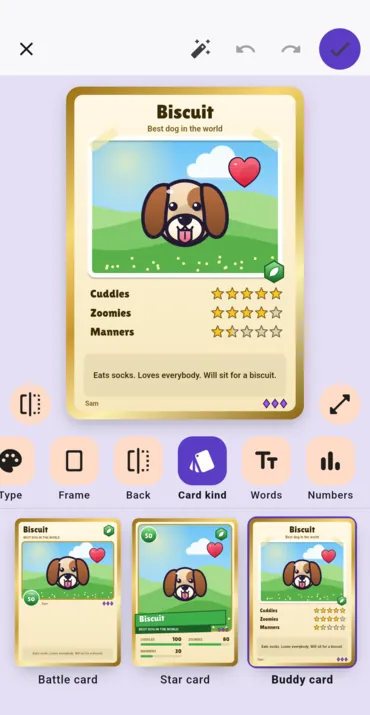
There are three kinds of card. A battle card has a power number, two moves and a motto. A star card is a sports card: a big picture, a number and four stat bars. A buddy card is for pets, friends and family, with star ratings and a few lines about them. Switching between them loses nothing. There are 56 hand-drawn stickers, ten types, six frames and four rarities, and a legendary card gets a foil shine that follows your finger.
Every card has a back. Pick a pattern or a scene, keep the badge with your name on it, or decorate the back with its own stickers, drawing and photo. Cards can go into decks, numbered like a real set, and a deck can share one back.
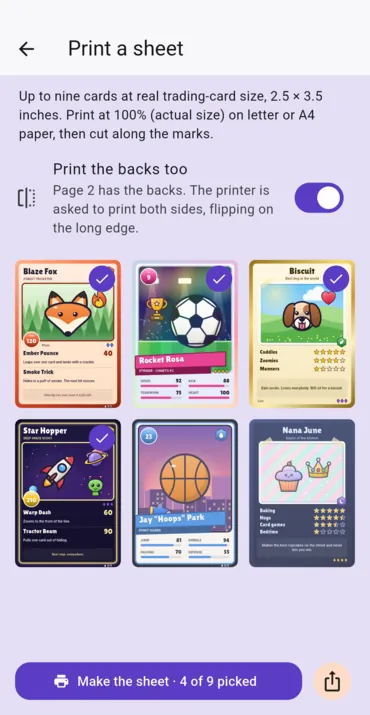
Share a card as one picture, front and back side by side, or print a sheet of up to nine at real trading-card size, 2.5 × 3.5 inches, with cut marks. The backs go on a second page, and the printer is asked to print both sides so each back lands behind its own front.
It pays you nothing, which on this site needs saying: there are no coins in it, no balance and no cash-out, and it sits apart from the reward apps for that reason. It is free, with nothing to buy, and carries one small banner ad on the home screen and none while a card is being made. Every ad request is marked as directed at children, so it is not personalized, and the app never shows a tracking prompt. Cards and photos stay on the device, with no account; what the app does send — the ad, anonymous analytics, crash reports and an update check — is set out in its own privacy policy.
It is not in either store yet. It is waiting on Apple’s review and Google Play’s, and this page will carry the download buttons the day each listing goes live, not before. There is no browser version.
Screenshots
How to make a card
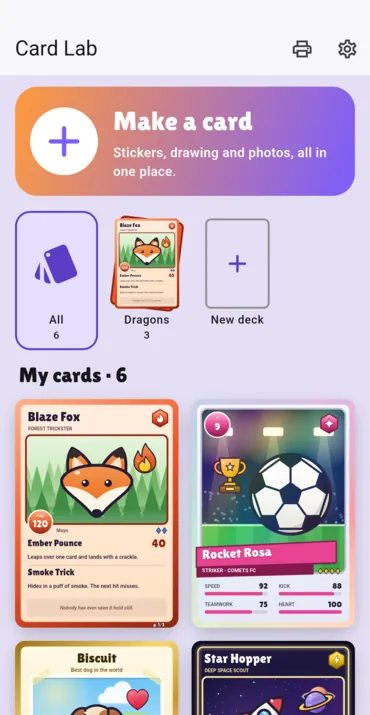
- Tap Make a card. A card is already there, ready to change.
- Tap a picture button under the card: stickers, draw, photo, background and the rest. Drag a sticker to move it and pinch to size it.
- Tap the dice for a new name, or pick moves from the list.
- Tap Back to turn the card over and decorate the back.
- Tap the tick to keep it, then share it or print a sheet.
Features
- Opens on a finished card, with no questions first
- Picture buttons first and words second, for makers who do not read yet
- 56 hand-drawn stickers to drag, pinch and turn
- Draw with your finger, over the picture or the whole card
- A photo on the front, and another on the back
- Battle, star and buddy cards, switched without losing anything
- Ten types, six frames and four rarities, with a foil shine on legendary
- A back for every card: a pattern, a scene or your own design
- Decks, numbered like a real set, with a shared back
- Print sheets of nine at real size, with the backs behind the fronts
- Undo and redo everything
- No account, no purchases, and no ad while you make a card
- English, Spanish, French, German and Portuguese
Frequently asked questions
When is it coming out?
It is coming soon to the App Store and Google Play, for iPhone, iPad and Android. Both are waiting on review. This page will carry the download buttons the day each listing goes live, and not before — there is no store link here yet because there is no listing to link to.
Does this app pay me anything?
No. It has no coins, no balance and no cash-out. The apps we publish that pay are on our apps page.
Is it free?
Yes, with nothing to buy. It carries one small banner ad on the home screen and none while a card is being made. The ads are marked as directed at children, so they are not personalized.
Is it safe for young children?
It is rated 4+ on the App Store. There is no account, no chat and no way to see other people’s cards. The privacy policy, the support form and Delete my data sit behind a grown-up check. A card only leaves the device when someone shares it on purpose.
Where are my cards kept?
On the device. Cards, decks and photos are never uploaded, and there is no sync. Settings › Delete my data removes all of them. More in the privacy policy.
How do I print cards?
Choose up to nine cards and print the sheet at 100% on Letter or A4 paper, then cut along the marks. Each card comes out at 2.5 × 3.5 inches. Turn on the backs and a second page carries them, placed so that printing on both sides puts each back behind its front.
Can I make cards from a game or a TV show?
Card Lab has its own types, frames and stickers, all drawn for it, and none of them copies a franchise. It is not affiliated with, or endorsed by, any trading card game.
Everything else we publish
 Daily: Learn and EarnEducation
 Step and EarnHealth & Fitness
 Play and EarnGames
 Todo and EarnProductivity
 Taco Rain: Catch the TacosCasual
 Peel FrenzyCasual
 Asteroid DuelAction
 Pie Cannon: Carnival ShootoutCasual
 Ship It: Build an App StudioSimulation
 Bramble KnightPlatformer
 BroadsideArcade
 Acorn TrailPuzzle
 Wobble WheelieArcade
 Tilt DuoArcade
 HoverlineRacing
 Mix a BeastCasual
 Sizzle SwapCasual
 Community Stress First AidHealth & Fitness
 Apps That PayFinance
 Stitch Keeper: Row CounterLifestyle
 Handyman CalcTools