About Stitch Keeper: Row Counter
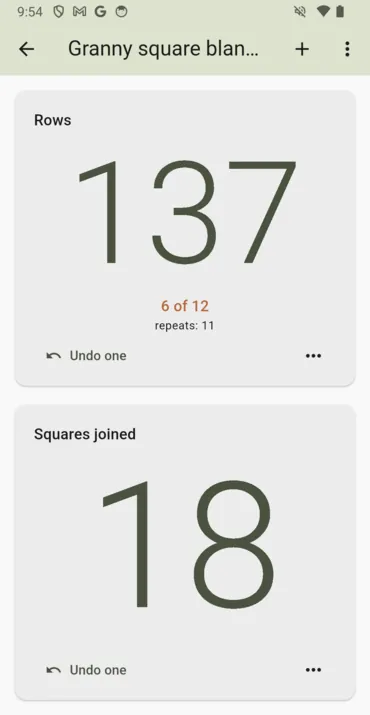
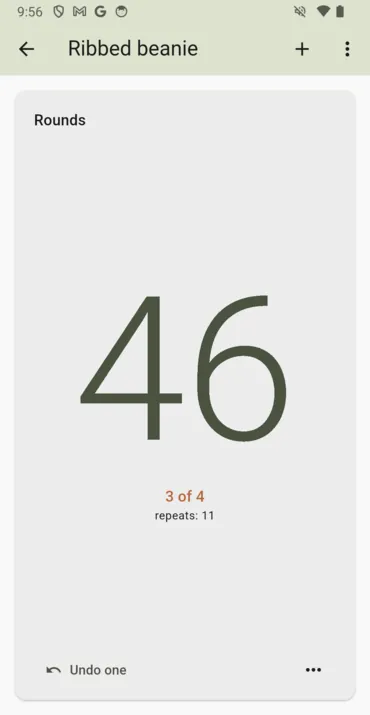
Stitch Keeper is a row counter. You tap to count, and every tap is saved the moment you make it, so a phone that locks in your project bag mid-row loses nothing. The whole counter is the button, because it is used with a hook or a needle in the other hand, and a project with one or two counters gives them the whole screen, so the number is big enough to read from your lap.
It pays you nothing, which on this site needs saying first: there are no coins in it, no balance and no cash-out. It is a tool, like Apps That Pay and Community Stress First Aid, not one of the reward apps.
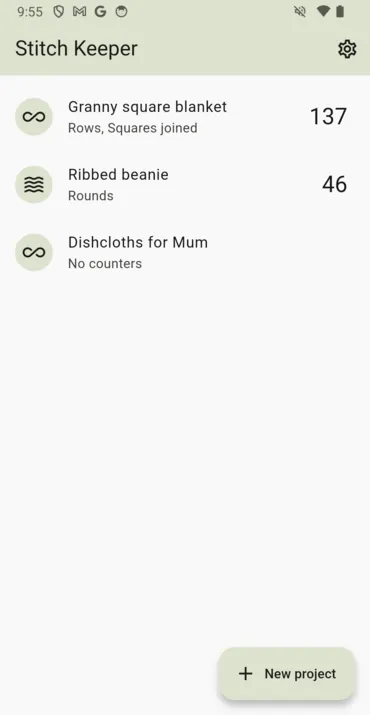
Each project holds as many counters as it needs — rows on one, rounds or increases or squares joined on another — each with a name you choose. Give a counter a repeat length and it shows where you are inside the repeat and how many full repeats you have finished, so you stop doing that arithmetic in your head. There is an undo for the tap you did not mean, and edit and reset sit behind a menu where a stray thumb will not find them.
On a phone, each tap gives a light buzz and the tap that finishes a repeat gives a stronger one, which is how the screen is read without looking. The screen stays awake while you count, and lets go after half an hour without a touch, so a phone left in a bag goes dark instead of counting the bag's contents.
If you use the same counters on every sock or every square, save them as a setup and start the next project from it. A setup keeps the counters and their repeats and never copies a count.
It is coming to Google Play as a free app with one banner ad, on the project list only. There is no ad on the counter screen, and there will not be: that screen is held open for hours while both hands are busy. Your projects are stored on your device, there is no account, and it has its own privacy policy saying exactly what the app sends.
Screenshots
How to use it in the moment
- Start a project: give it a name and mark it as crochet or knitting. It opens straight onto a row counter.
- Tap anywhere on the counter to count a row. Tap Undo one if you miscounted.
- Add a second counter with the + button for rounds, increases or squares joined, and give either one a repeat length.
- Watch the repeat line under the number: it tells you where you are inside the pattern repeat.
- Save the project's counters as a setup from the ⋯ menu, and pick it under Start from next time.
Features
- The whole counter is the button, sized to the screen when a project has one or two counters
- As many named counters per project as you need
- Pattern repeats: where you are in the repeat, and how many you have finished
- Undo, and edit and reset behind a menu
- Every tap saved the moment you make it
- Saved setups to start the next project from, without the counts
- Rename or delete a project from inside it
- A photo for each project, on Android
- A light buzz per tap and a stronger one at the end of a repeat, on Android
- Works with large text and screen readers, on phones and tablets
- No account, no sign-up, and no ad on the counter screen
Frequently asked questions
When is it coming out?
It is coming soon to Google Play, for Android phones and tablets. This page will carry the download button the day the listing goes live, and not before. Until then, the browser version is the same app, built from the same code.
Does this app pay me anything?
No. It has no coins, no balance and no cash-out. The apps we publish that pay are on our apps page.
Is it free?
Yes. The Android app will carry one banner ad on the project list and none on the counter screen, and there is nothing to buy. The browser version has no ads at all, because the ad network has no browser version.
Where are my projects kept?
On your device. There is no account and no sync. In the browser version they are kept in that browser's storage, so they do not follow you to another browser or to your phone, and clearing your site data loses them. More in the privacy policy.
Is there a gauge or yarn calculator?
No. It is a counter and a project log. That is what people who knit and crochet ask a phone for mid-row, so that is what it does.
Is there an iPhone version?
Not yet. It is coming to Google Play first. The browser version runs in Safari on an iPhone in the meantime.
Everything else we publish
 Daily: Learn and EarnEducation
 Step and EarnHealth & Fitness
 Play and EarnGames
 Todo and EarnProductivity
 Taco Rain: Catch the TacosCasual
 Peel FrenzyCasual
 Asteroid DuelAction
 Pie Cannon: Carnival ShootoutCasual
 Ship It: Build an App StudioSimulation
 Bramble KnightPlatformer
 BroadsideArcade
 Acorn TrailPuzzle
 Community Stress First AidHealth & Fitness
 Apps That PayFinance
 Handyman CalcTools