The short answer
Yes, Step and Earn pays real money for walking, and not much of it. It reads your steps from Apple Health or Health Connect and pays a coin for every 500, up to twenty a day. A coin is a tenth of a cent. The first PayPal cash-out is at 2,000 coins ($2.00), about 58 full walking days with no videos at all. It's free on iPhone and Android, with no account and nothing to buy.
Screenshots
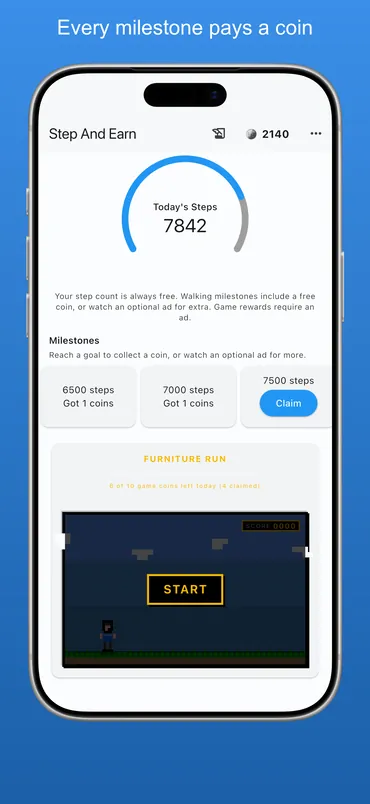
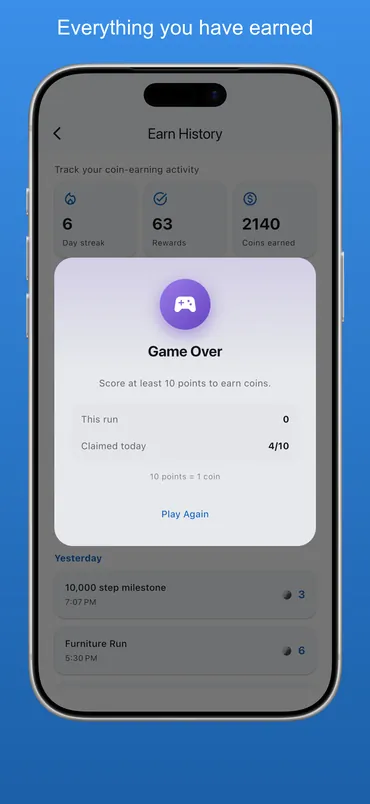
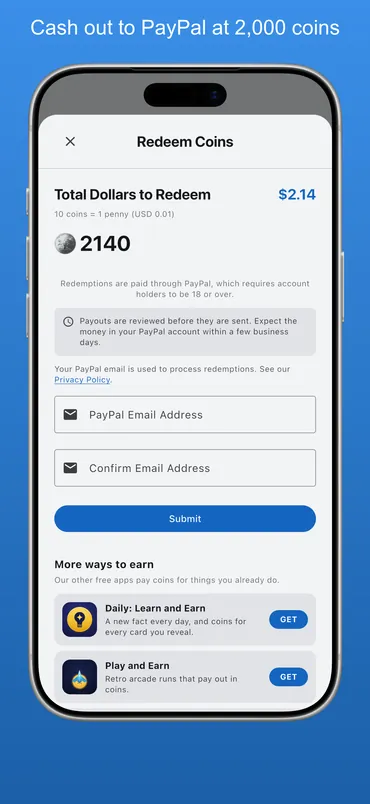
Everything for Step and Earn
- Our four reward apps compared: how long each one takes to reach its first $2.00.
- Apps like Sweatcoin: the walking apps that pay cash, and the ones that do not.
- Sweatcoin review: what it pays out, and why it is not cash.
- How much Sweatcoin pays: coins per 10,000 steps, worked out.
- Do walking apps really pay: where the money comes from, and how much there is.
- Reward apps and your battery: what step counting costs in battery and data.
- How rewards work: how coins are earned, and how PayPal redemption works.
About Step and Earn
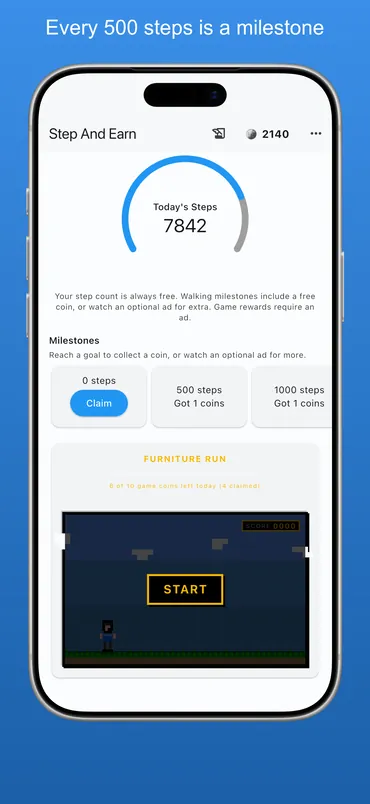
Step and Earn rewards the walking you are already doing. The app reads your step count from your phone and turns it into coins. Every 500 steps is a milestone you can claim, twenty of them a day up to 10,000, and each one pays a coin.
The walking half needs nothing from you. You don't start a workout or log anything. The step count comes from Apple Health on an iPhone and from Health Connect on an Android phone, and the milestones stack up as you go about the day. Either way the app only ever reads steps. It never writes anything back, and the count goes nowhere except into your own copy of your progress.
Two other things pay, and they are the part people miss. There is a daily check-in worth 10 coins, with 30 more on every seventh day in a row. The streak behind it survives until you miss a whole day instead of resetting at midnight. And there is Furniture Run, a quick retro jumper for when you are not walking: ten points scores a coin, up to ten coins a day. Between them they're a real share of how a balance grows, so they're named here instead of left for you to find after you install.
How it works
- Install the app and allow it to read your step activity — from Apple Health on an iPhone, or Health Connect on an Android phone.
- Walk as you normally would — the step count arrives on its own.
- Claim a milestone every 500 steps for a coin, twenty a day up to 10,000.
- Check in daily for 10 coins, and 30 more every seventh day in a row.
- Play Furniture Run for up to 10 more coins a day.
- Cash out to PayPal at 2,000 coins ($2.00), then at 5,000 ($5.00).
Features
- Step counts read from Apple Health, or Health Connect on Android — read only, never written
- A milestone every 500 steps, twenty a day up to 10,000, a coin each
- A daily check-in for 10 coins, and 30 more every seventh day in a row
- Furniture Run, a retro jumper worth up to 10 more coins a day
- Earn history: every milestone and game payout, grouped by day
- An optional evening reminder, which skips days you have already finished
- First cash-out at 2,000 coins ($2.00), then 5,000 ($5.00)
What it actually pays
The whole calculation is public, so here it is done. Twenty milestones a day at a coin each and 10 coins for the daily check-in is 30 coins on a full day, with 30 more on every seventh consecutive day — 240 coins in a perfect week. A coin is a tenth of a cent, and the first cash-out is 2,000 coins, or $2.00. Derived: about 58 days to a first payout without watching a single video. Furniture Run's up to 10 coins a day are left out of that, because collecting them takes a short video.
A video adds three to nine coins to a milestone already claimed. Taken on every milestone, a day runs roughly 100 to 220 coins and the same $2.00 arrives in about 10 to 20 days. Claiming a walking milestone never needs one. The gap between the two figures is there because the money comes from advertising.
This site keeps score of caps like this elsewhere, so here is ours: the 10,000-step ceiling means a 20,000-step day earns exactly what a 10,000-step day earns. We criticize Sweatcoin for burying the same kind of cap in a help article about a different subject. We have one too. The difference is where ours is written: in the feature list above, on the walking-app comparison, and here.
Frequently asked questions
Is Step and Earn free?
Yes. No purchase, no subscription, and no fee taken out of what you cash out.
What do I need to run it?
An iPhone on iOS 15.0 or later, or an Android phone. It needs permission to read your step activity, from Apple Health on the iPhone and from Health Connect on Android. The two stores rate it differently: 13+ on the App Store, Mature 17+ on Google Play. Nothing on the screen differs between them; Play files the cash reward itself at that tier, and PayPal requires account holders to be 18 either way.
Why is there no iPad version?
Because it would not count anything. This is the one app of ours that's iPhone-only on Apple's side, and that's deliberate. It pays you for steps, and an iPad is not a thing you carry on a walk. It is a separate question from Android, which it does run on. The other three all run on iPad, and Todo and Earn has a split view built for it.
Do I have to start a workout for my steps to count?
No. Step and Earn reads your daily step count from Apple Health, or from Health Connect on Android, so ordinary walking counts without you starting or logging anything. The daily check-in is separate and does need a tap. It's worth 10 coins, and 30 more on every seventh day in a row, but skipping it never costs you a step.
What is Furniture Run?
A quick retro jumper inside the app, for when you're not walking. Ten points scores a coin, up to ten coins a day. Game coins need a short video to collect, and your score is saved if the video doesn't load, so a failed ad never costs you a run. Note that "points" there means the game score — the reward is still coins, the same coins the milestones pay.
How much do I need to cash out?
2,000 coins, which is $2.00, the first time. After that it is 5,000 coins, or $5.00. PayPal charges us a fee on every transfer, and it takes a large share of a $2.00 payment, so fewer, larger payments leave more of the money with you. A steady walker reaches the first one in about two months on milestones and check-ins alone, or in 10 to 20 days taking the optional bonus videos.
How do I get paid?
Your walking builds a coin balance, and you redeem that balance for cash through PayPal from inside the app.
Is there an Android version?
Yes, it's on Google Play now. The one real difference is where the steps come from: Apple Health on an iPhone, Health Connect on Android. Health Connect is the system component Google uses for exactly this, and some phones need it installed before the app can read anything. Everything else is the same build — twenty milestones, the daily check-in, Furniture Run, and a first cash-out at 2,000 coins with 5,000 after it. All four reward apps are now on both stores.
If I switch phones, do my coins come with me?
No, and it's worth knowing before you build a balance up. Coins live on the device rather than in an account. Your iPhone balance and Android balance are separate, and each has to reach 2,000 on its own. Nothing transfers, so cash out before you change phones. We flag it up front because we've criticized another app for burying the same thing; see our Mistplay review.
Who makes Step and Earn?
Illumination Development, L.L.C., an independent developer based in Phoenix, Arizona. James Krupnik builds the apps and writes this site; the about page says more. The same company publishes three other reward apps and fourteen apps that pay nothing.
Is Step and Earn legit?
Judge it on the terms rather than on us. You never pay anything: no purchase, no subscription and no deposit, and payouts are funded by the ads in the app. The cash-out rules are written out in our terms, coins don't expire, and we charge no fee on a payout. It is pocket money, not income. Are reward apps safe? covers what to check in any app like this one, ours included.
How long does a PayPal payout take?
Normally three to five business days after you confirm the redemption in the app, sent to the PayPal address you enter. We may hold a payment briefly while we check the activity behind it, and we tell you if we do.
Why can't I cash out yet?
Usually one of four things. The balance is under 2,000 coins for a first payout, or under 5,000 after that. You need to be 18 or older to receive a PayPal payment. A payment can be held briefly while the activity is checked. Or the PayPal address entered was wrong, so check it before you confirm. If none of those fits, write to support with the PayPal address you redeemed to and the date.
Tools from us, with no coins
We make more than reward apps. These are free in the stores, and there are no coins in them to cash out. Most carry a banner ad, and each page says what the app collects.
 Community Stress First AidGuidance for stress and crisis, with the 988 Lifeline one tap away.
 Handyman CalcAdds feet, inches and fractions, with material calculators beside it.
 Card Lab: Trading Card MakerMake your own trading cards, front and back, and print them.
 Dead Center: Card CenteringPhotograph a trading card and measure its centering before grading.
 Practice Proof: Practice LogA practice log that counts only the minutes it hears you play.
 Which FormulaNames the method an Algebra 2 or trig problem needs, not the answer.
 Househand: Home MaintenanceTracks the jobs a house needs and tells you when each one is due.
 Chess Clock & ScorepadA two-player chess clock that can also keep the scoresheet.
 Initiative Tracker: DM ToolsTurn order, hit points and conditions for running combat.
 Covert Mail: Morse & CiphersLearn Morse code by ear and crack the ciphers people really used.
 Let Them Pray: Prayer ListA private prayer list for every faith, kept on your phone.
 Low Tide Explorer: Tide PoolsTide pool creatures and the best low tides in the Pacific Northwest.