About Dead Center: Card Centering
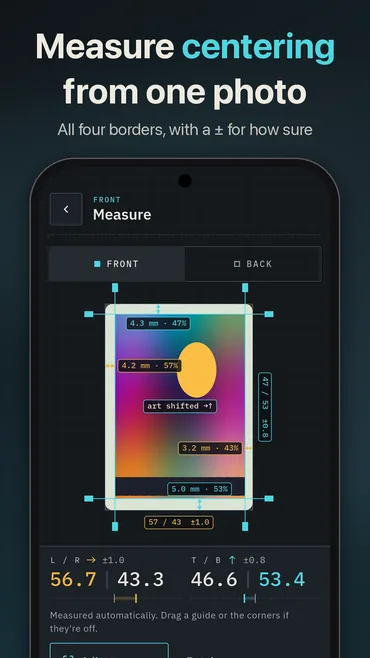
Line the card up in the guide and take a photo, or pick one you already took. Dead Center finds the card’s edges, flattens the photo so a tilted phone can’t skew it, and measures all four borders: white, colored or silver. You get the left/right and top/bottom centering, like 55/45 or 60/40, and which way the art is off. No card to hand? The Try a sample card button measures a made-up one that comes with the app.
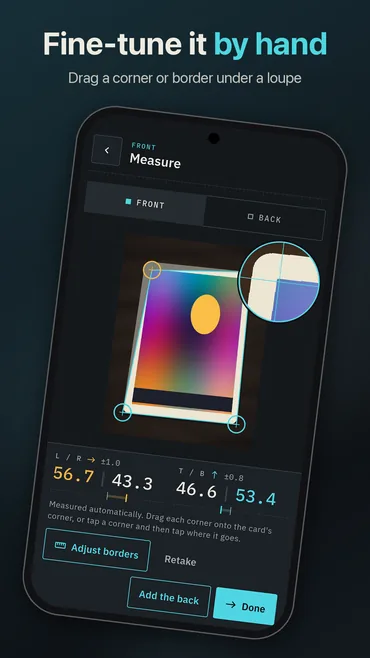
There is no AI grade in it. The measurement is plain geometry, so the same photo always gives the same numbers, and it says how sure it is. When the borders are hard to read you get a ± range, and when they can’t be read at all, as on a full-art card with no border, it says why and gives no numbers rather than wrong ones. You can drag any border line or corner under a magnifier to place it yourself.
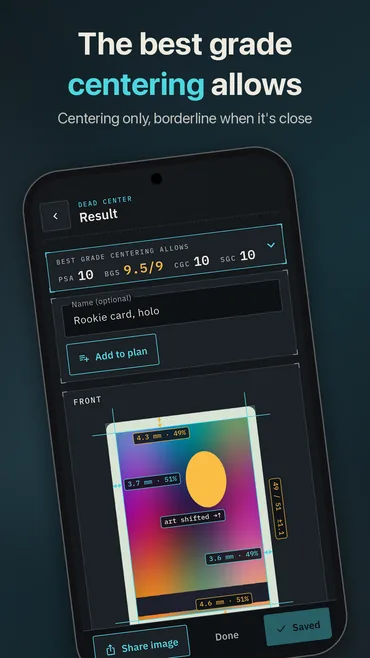
Measure the back as well and it shows the best grade centering alone allows at PSA, BGS, CGC and SGC, and whether the front or the back is holding the card back. When a card misses a company’s next limit you see the reading against the limit, like 56.7/43.3 against 55/45, and which border is wide. Centering is one part of a grade: corners, edges and surface can only lower it, and the app says so. The limits come from each company’s published centering standards. Dead Center is not affiliated with or endorsed by any of them.
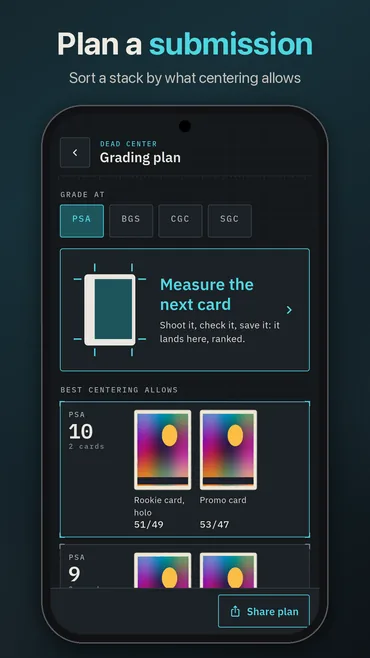
Got a stack to send in? Plan a submission measures the cards one after another and sorts them by what their centering allows at the company you pick, with borderline cards marked. The plan shares as text or as a CSV file for the submission form.
It pays you nothing, which on this site needs saying: there are no coins in it and no cash-out, and it sits apart from the reward apps for that reason. It is free, with nothing to buy and no paywall, and carries one small banner ad that is never on screen while you photograph or measure a card. There are no pop-up ads. Photos stay on the phone, with no account; what the app does send (the ad, anonymous analytics and crash reports) is set out in its own privacy policy.
It has been on Google Play since October 2026, for Android phones and tablets, in English, Japanese, Spanish, German and French. The iPhone and iPad version is not in the App Store yet, and this page will carry that button the day the listing goes live, not before.
On a computer? The card centering calculator on this site measures a photo you line up by hand, against the same published limits.
Screenshots
How to measure a card
- Tap Measure a card and line the card up inside the guide.
- Take the photo, or choose one you already took.
- Check the border lines. Drag one under the magnifier if it is off.
- Add the back if you want the grade limits for both sides.
- Save the card with a name, or share an image with the lines on it.
Features
- Left/right and top/bottom centering from one photo
- Same photo, same numbers, with a ± for how sure it is
- White, colored and silver borders
- Front and back, with the best grade centering alone allows at four companies
- Fine-tune any line or corner by hand under a magnifier
- Plan a submission: sort a stack, export a CSV
- Share an image with the centering lines for sale and trade posts
- No account, and your photos stay on your phone
- One banner, never while you measure; no pop-ups and no paywall
- English, Japanese, Spanish, German and French
Frequently asked questions
Is it on iPhone?
Not yet. It is on Google Play for Android phones and tablets. This page will carry the App Store button the day that listing goes live, and not before.
Does it tell me what grade my card will get?
No. It measures centering, which is one part of a grade, and shows the best grade centering alone allows at each company. Corners, edges and surface can only lower that, and a photo can’t judge them, so the app doesn’t pretend to.
How accurate is it?
On a sharp, square photo of a bordered card it is usually within a point or so, and every reading carries a ± so you know how far to trust it. A reading close to a company’s limit is marked borderline. Cards in a slab are not measured, and full-art cards with no border are refused rather than guessed at.
Does this app pay me anything?
No. It has no coins, no balance and no cash-out. The apps we publish that pay are on our apps page.
Is it free?
Yes, with nothing to buy and no paywall. It carries one small banner ad, which is never on screen while you photograph or measure a card.
Where are my photos kept?
On your phone. There is no account and no sync, and Settings › Delete my data erases every card and photo. More in the privacy policy.
Is it affiliated with PSA, Beckett, CGC or SGC?
No. Dead Center is not affiliated with or endorsed by any grading company. The limits it shows are from each company’s published centering standards.
Everything else we publish
 Daily: Learn and EarnEducation
 Step and EarnHealth & Fitness
 Play and EarnGames
 Todo and EarnProductivity
 Taco Rain: Catch the TacosCasual
 Peel FrenzyCasual
 Asteroid DuelAction
 Pie Cannon: Carnival ShootoutCasual
 Ship It: Build an App StudioSimulation
 Bramble KnightPlatformer
 BroadsideArcade
 Acorn TrailPuzzle
 Wobble WheelieArcade
 Tilt DuoArcade
 HoverlineRacing
 Mix a BeastCasual
 Sizzle SwapCasual
 Community Stress First AidHealth & Fitness
 Apps That PayFinance
 Stitch Keeper: Row CounterLifestyle
 Handyman CalcTools
 Card Lab: Trading Card MakerEntertainment
 Practice Proof: Practice LogMusic & Audio
 Househand: Home MaintenanceHouse & Home
 Chess Clock & ScorepadTools
 Initiative Tracker: DM ToolsEntertainment
 Covert Mail: Morse & CiphersEducation