The short answer
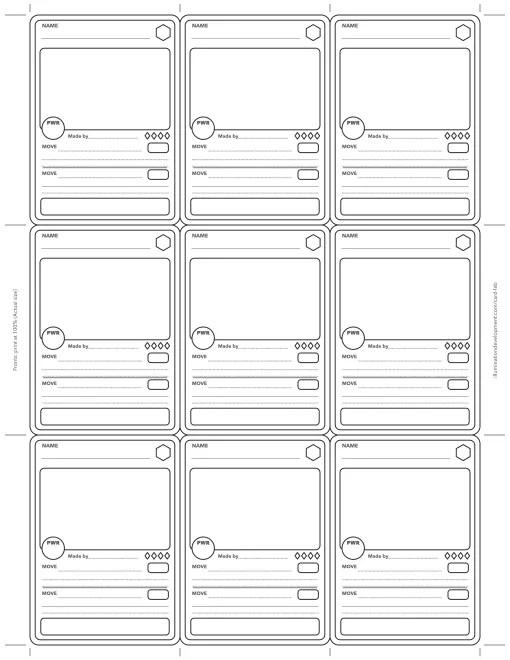
This is a free PDF of blank trading cards. Page 1 has nine card fronts, each 2.5 by 3.5 inches, and page 2 has nine backs. Print it at 100% on US Letter or A4, double-sided with the long edge flipped, then cut on the lines between the marks.
What is on each card
The fronts use Card Lab’s battle-card layout. There is a line for the name and a hexagon for the card’s type in the top corner. Under them is a big box for the picture and a round badge for its power number, with four diamonds for rarity. Below that are two moves, each with a name, a box for its number and two lines to say what it does, and a strip at the foot for a motto. A “Made by” line takes the maker’s name.
The backs have a star emblem in the middle and a blank ribbon underneath, for a set name or the maker’s.
How to print them
Choose Actual size or 100%, never Fit to page, or the cards come out smaller than a sleeve. Turn on two-sided printing and pick flip on long edge. With no duplex printer, print page 1, put the sheet back in face down with the top edge first, and print page 2. Hold the first sheet up to a window to check the backs line up before you print more.
Card stock gives the best cards. On plain paper, glue the sheet to thin card before cutting. Cut along the lines that run between the marks in the margins. A paper trimmer keeps the edges straight, and rounding the corners with scissors makes them look bought.
Ideas for the cards
Make a card for the family dog, everyone on a team, a character from a story you are writing, or a set of monsters for a game of your own. Draw your own symbol in each hexagon, so a fire card and a water card each get their own. The Card Lab coloring pages have bigger blank cards and the ten type gems to copy, if you want a starting point.
Frequently asked questions
What size is a trading card?
2.5 by 3.5 inches, or 63 by 88 mm. That is the size of most collectible card games and sports cards, so standard card sleeves fit. Every card on this template is that size when it prints at 100%.
How do I print trading cards double-sided?
Print both pages and choose flip on long edge. The cards sit in the middle of the page, so each back lands behind a front. Without a duplex printer, print page 1, put the sheet back in the tray face down with the top going in first, and print page 2.
What paper should I print trading cards on?
Card stock, somewhere around 65 to 110 lb cover (175 to 300 gsm), if your printer feeds it. Plain paper works too: glue the printed sheet onto thin cardboard, such as a cereal box, before you cut.
Will the template print on A4 paper?
Yes. Choose Actual size, not Fit to page, and the cards still come out at 2.5 by 3.5 inches, with about a centimetre of paper left at each side.
Can I make a trading card on the computer instead?
Yes. The free trading card maker on this site makes one card at a time in a browser and prints it at real size, and Card Lab does the same on a phone or tablet.
Card Lab on your phone
Card Lab makes the same cards on a phone or tablet, with stickers, drawing and photos on the front and a back of your own. It prints a sheet of up to nine at real size, with the backs placed behind the fronts. It's free on the App Store and Google Play.
Download on the App Store ▶ Get it on Google Play
Save this sheet to Pinterest · More about Card Lab

The trading card maker makes one card at a time in your browser, and the Card Lab coloring pages have bigger blank cards to color. There's more on the printables page.