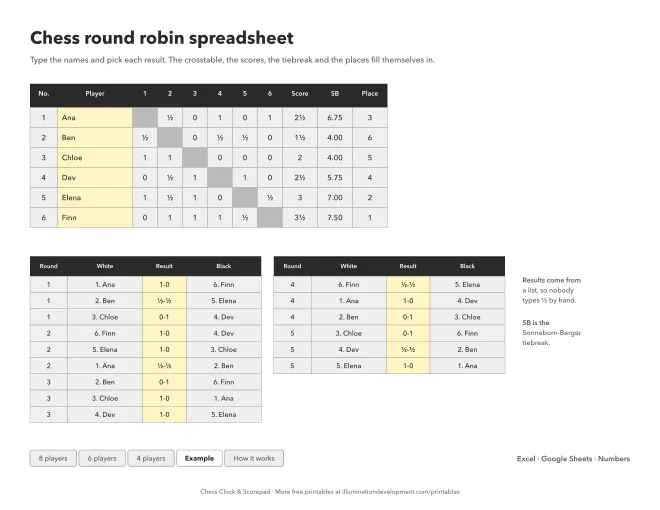
What's in the file
Three tabs for three sizes of group: 8 players, 6 and 4. Seven players use the 8 tab with the last row left empty, and five or three do the same on the smaller tabs. Whoever is paired with the empty number has the bye that round.
Each tab has the crosstable on the left and every round's pairings on the right, white first. They're the same Berger pairings as on the printable crosstable, so you can pin that one to the wall and keep score here. An Example tab is filled in with six made-up players, so you can see it working before you type anything.
How to use it
Draw lots for the numbers and type each name in its row. After each game, click its result cell and pick 1-0, ½-½ or 0-1. It's a list because Excel likes to turn a typed 1/2 into a date.
Everything else is formulas. The result goes into both players' rows, the scores add up, and the places sort by points. A tie on points goes to the Sonneborn-Berger score: the points of everyone you beat, plus half the points of everyone you drew. Players still level after that share the place.
For Google Sheets, upload the file to Drive and open it with Sheets. Excel and Numbers open it as it is. There are no macros, so nothing asks for permission.
Chess Clock on your phone
Chess Clock & Scorepad runs the clock for each of these games and records the moves as they're played. A finished game can be shared as PGN. It's free on Google Play.
Save this sheet to Pinterest · More about Chess Clock

There's a chess score sheet to go with it. There's more on the printables page.