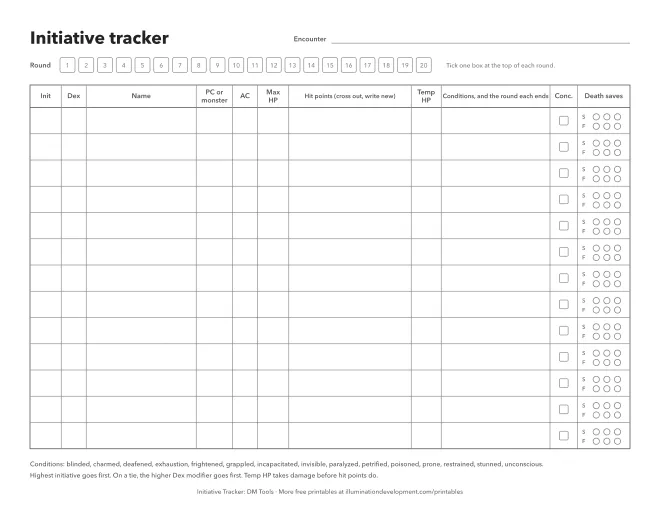
What is on the sheet
Each of the thirteen rows is one combatant. The columns run from initiative and the Dexterity modifier through name, AC and maximum hit points to a wide box for current hit points. After that come temp HP, conditions, a box for concentration, and three success and three failure circles for death saves.
Across the top is a row of twenty boxes for the round count. The fifteen conditions are listed along the bottom, so their names are there when you need one.
How to use it
Once everyone has rolled, write the combatants in from the highest initiative down. Put each one's Dexterity modifier beside the roll, because a tie goes to whoever has the higher modifier. That is a common table habit rather than the rule; how initiative works in 5e has what the SRD says about ties, surprise and death saves.
Mark P or M in the next column for a player or a monster. When something takes damage, cross out its hit points and write the new number next to them. Temp HP goes in its own box and comes off first.
A condition goes in with the round it ends, so “prone” on its own or “frightened, end of rd 4”. Tick a round box at the top of each round, and the end of a condition is easy to spot.
Before the fight, the encounter calculator says how hard it will be for your party under the 2024 XP budget.
Rather keep track on a screen? The free online initiative tracker keeps the turn order, hit points, conditions and death saves in your browser.
Initiative Tracker on your phone
Initiative Tracker: DM Tools runs the same table on a phone. It sorts the order as rolls come in, takes damage off temp HP first, and counts conditions down at the end of each creature's turn. It also holds the full SRD stat blocks. It's free on the App Store and Google Play.
Download on the App Store ▶ Get it on Google Play
Save this sheet to Pinterest · More about Initiative Tracker

There's a 5e conditions cheat sheet to go with it. For the rest, see all the printables.