What is on the sheet
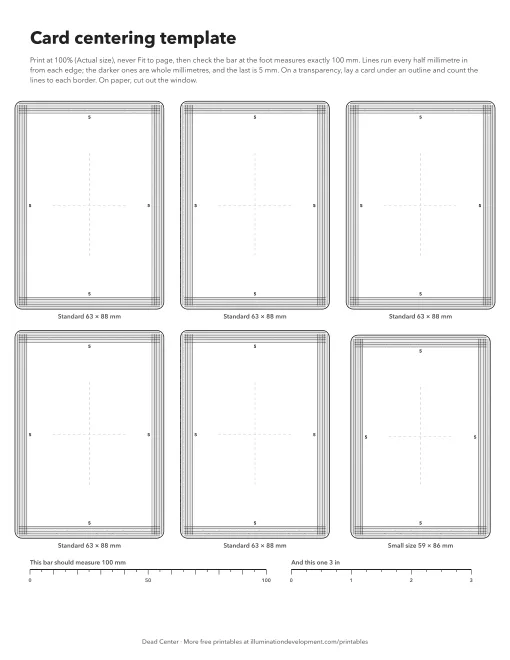
Six card outlines at true size: five standard cards, 63 by 88 mm (about 2.5 by 3.5 inches), and one small-size card, 59 by 86 mm. Inside each outline, lines run parallel to every edge every half millimetre, out to 5 mm, with the whole millimetres darker and the 5 mm line marked. Dashed lines mark the middle of the card both ways.
At the foot is a bar that should measure exactly 100 mm, and one that should measure 3 inches, so you can check the print came out at the right size.
How to use it
Print at 100%, or “Actual size”, never “Fit to page”, and measure the 100 mm bar with a ruler. If it is off, the lines are off by the same amount.
The best way is to print it on an inkjet or laser transparency, whichever your printer takes. Lay it over a card with the outline on the card’s edge, and count the lines from the edge to the printed border on each side. On plain paper, cut out the inside of an outline and lay the window over the card.
Write down the four border widths, then put them into the card centering calculator: type them in, and it gives the left/right and top/bottom centering and the best grade centering alone allows. The card centering chart has the limits for every grade.
Frequently asked questions
How do I check card centering at home?
Measure the left and right borders, and the top and bottom, with a millimetre ruler, a loupe or this template, then divide the wider border by the pair. The card centering calculator does the arithmetic.
What size is a standard trading card?
Most are 63 by 88 mm, about 2.5 by 3.5 inches. Some Japanese cards and other small-size cards are 59 by 86 mm; the template has one of those too.
Why does the template print the wrong size?
The print dialog scaled it. Choose 100% or Actual size, not Fit to page or Shrink oversized pages, and check the 100 mm bar with a ruler.
Can I use it on a card in a sleeve or top loader?
On a sleeve, yes, with care. A top loader or slab sits too far from the template for the lines to line up with the card’s edges.
Dead Center on your phone
Dead Center does this from a photo: it finds the card’s edges and borders, measures them, and gives each reading a ± for how sure it is. It's free on Google Play.
Save this sheet to Pinterest · More about Dead Center

The card centering chart goes with it. There's more on the printables page.